Sprint plan template
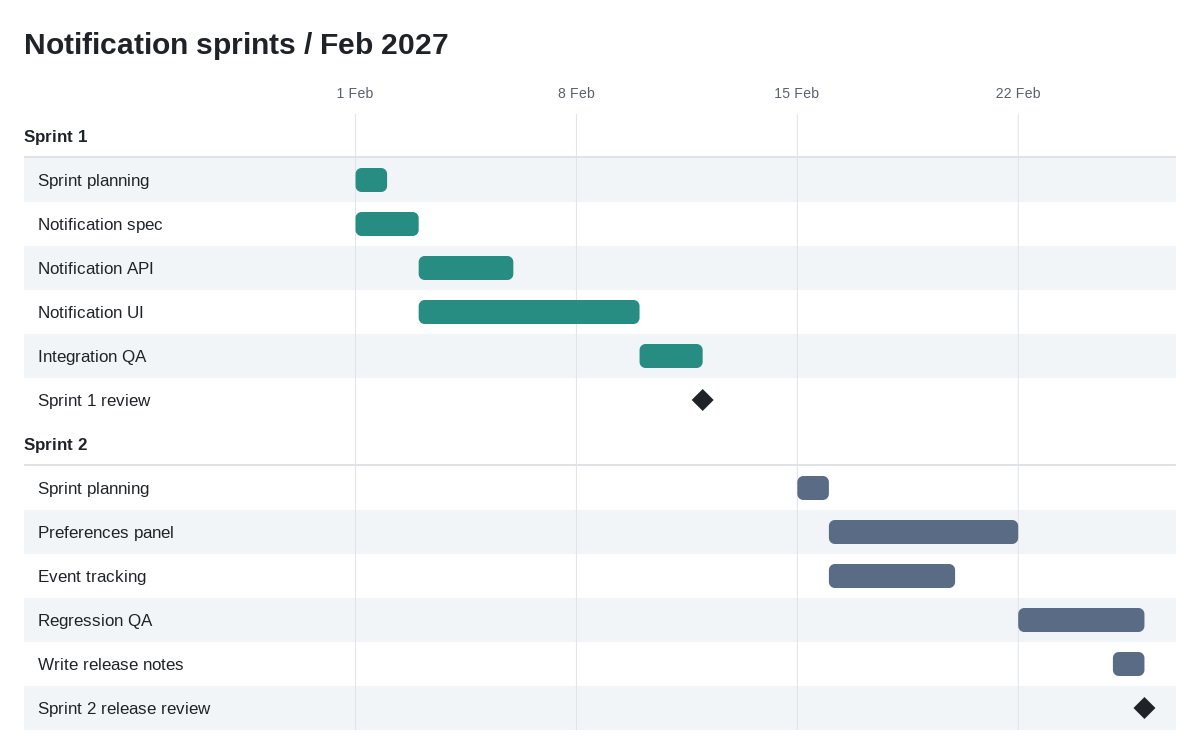
Plan two two-week sprints for an in-app notifications feature, from the first build to release review.
 Open full-size chart
Free template. No account needed.
How to use this template
- Download the CSV and open it in your spreadsheet app.
- Replace the notification tasks with work for your sprint goal. Set dates for build, testing, and review around your team’s availability.
- To draw your own chart, copy the plan text, edit the sprint sections, and paste it into a Gantt app below.
End dates include the last scheduled day. Dependencies in the CSV are notes you can update as dates change.
Draw it in your tool
- Confluence & JiraGuideStore listing
- Adobe ExpressGuideStore listing
- FramerGuideStore listing
- BubbleGuideStore listing
FAQs
What should I do with unfinished work after Sprint 1?
Return it to the backlog and reassess it during Sprint 2 planning. If the team takes it on, schedule the remaining work as its own row.
Can more than one task run at a time?
Yes. The API and UI work overlap in the example. Use a dependency for QA so it starts after both are ready.
Does a bar across a weekend mean the team is working then?
Bars show elapsed calendar time. Split a task into separate rows if you need the chart to show exactly which days people work.